

PayNow for Casino Deposits: speed, bank identification and transaction status
PayNow is widely used in Singapore for fast bank transfers, and some gambling operators accept it for deposits. The reason is simple: it’s an account-to-account transfer made inside your banking app, so the money can arrive quickly and the payment trail is usually clearer than with many wallet-style methods. At the same time, PayNow is not “anonymous”: the bank and the recipient can see certain identifiers, and that affects privacy, chargeback expectations, and how you troubleshoot a rejected deposit.
PayNow as account-to-account transfer and why it suits fast deposits
PayNow is designed as a real-time domestic transfer method in Singapore that lets you send SGD using a proxy instead of a full account number. For individuals, that proxy is commonly a mobile number or NRIC/FIN; for businesses, it is typically the UEN, often paired with a PayNow QR. In practice, you initiate the transfer in your existing bank app, confirm the payee, and authorise the payment like any other bank transfer.
For casino deposits, the “account-to-account” part matters because the payment does not go through a separate wallet balance first. When the receiving side is correctly set up for PayNow Corporate and the operator’s cashier is configured to recognise the incoming reference, the deposit can be credited quickly. Speed still depends on the operator’s internal checks, but the transfer itself is intended to be near-instant once authorised, which is why PayNow is often positioned as a fast top-up option.
Another practical benefit is reconciliation. Many PayNow flows rely on a reference value: either you type it in, or it is embedded in the PayNow QR generated for that deposit session. That reference then appears on statements and transaction records, making it easier to match “money sent” with “deposit credited” when something goes wrong or when support asks for proof.
What happens during a PayNow deposit step-by-step
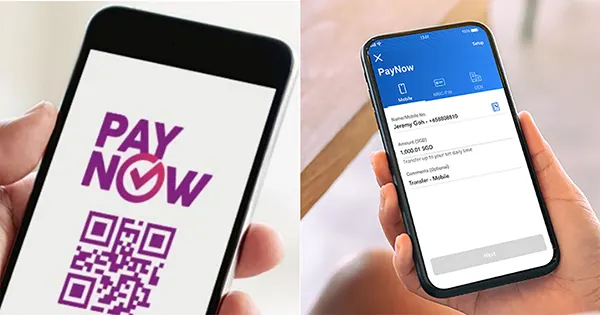
First, the operator provides a PayNow destination (commonly a UEN or a QR code). You open your bank app, choose PayNow, and either scan the QR or enter the proxy/UEN. Before sending, most banks show a payee-name or nickname confirmation step so you can verify you are paying the intended recipient, which reduces simple mistakes.
Second, you confirm the amount and submit the transfer. If the operator requires a specific reference (for example, a deposit ID), you need to enter it exactly as instructed, because it may be the main way their payments team links your incoming transfer to your casino account. If you omit it or change it, the money can still arrive but the deposit may not be auto-credited.
Third, you check two places: (1) your bank’s transaction history for the PayNow status message and (2) the operator’s cashier history for the deposit state. A “successful” bank status means the transfer reached the payee bank account; it does not automatically guarantee the casino has credited it to your player balance, because the operator can still place the deposit under manual review.
What the bank and the recipient can see and how that affects privacy
PayNow is built around identifiable proxies. When you register PayNow, your bank links your proxy (for example, mobile number or NRIC/FIN) to your chosen account. For corporate recipients, the UEN is used, and QR codes can embed key payment data such as the payee ID, amount, and a reference for reconciliation.
From a privacy perspective, the important point is that PayNow is not designed for hidden transfers. Banks generally display the payee information to help you confirm you are paying the right recipient, and transaction records are detailed enough to support tracing and reconciliation. That is useful for consumer protection in the “wrong payee” scenario, but it also means your transfer leaves a clear audit trail with your bank.
On the recipient side, businesses typically see incoming PayNow receipts in their account statements and reconciliation files, including the reference value used for matching. If a deposit is disputed, delayed, or credited to the wrong casino account due to a reference error, that visibility is exactly what the operator will use to investigate. In other words, PayNow tends to trade “speed and clarity” for “less secrecy”.
Practical privacy checks before you use PayNow for a deposit
Start with the payee confirmation screen. If your bank shows a payee nickname or name during a PayNow lookup, use it as a safety control. If the displayed name looks inconsistent with what the operator claims, do not send the money until you verify the payee details with official support channels.
Next, keep your reference clean and minimal. Use only what the cashier requests (often a numeric deposit ID). Do not add personal notes in the reference field. In many banking systems, the reference is stored in statements and can be visible to the receiving business for reconciliation.
Finally, be realistic about what privacy means here. A PayNow deposit is a bank transfer. Your bank can see the transaction and apply its compliance monitoring. If you need stronger privacy, PayNow is usually not the method that gives it; and if privacy is a concern because gambling is causing harm, the safer step is to pause deposits, set limits, or seek support rather than chasing more “private” workarounds.
Why PayNow payments get rejected and how to verify status and references
Most PayNow deposit issues fall into a few repeat patterns. The first is payee validation problems: wrong UEN, wrong proxy, or scanning an outdated QR. The second is reference mismatches: a missing deposit ID, a truncated reference, or an old reference reused for a new deposit session. The third is bank-side constraints such as transfer limits, account restrictions, compliance holds, or a temporary service issue.
When a payment is rejected, do not guess. Use the evidence your bank already provides: the transaction status label, the timestamp, and any available reference or transaction number. Many banks show the payee confirmation result (nickname/name) and keep a record of the transfer under PayNow in transaction history. That is your primary proof of whether the money left your account and whether it was accepted as “successful” or returned/failed.
Also check the operator’s side logically. A successful PayNow transfer means the funds reached the recipient account, but the casino may still show “pending” if they require manual review or if their system cannot auto-match your transfer due to reference issues. In that case, the fastest route is usually to provide support with your bank transfer details (date/time, amount, and the PayNow reference you used) and request a manual credit or an investigation.
Status checklist: what to capture before contacting support
Capture the basics from your bank app: date and time (including time zone if shown), amount, recipient identifier (UEN/proxy), the payee name/nickname shown at confirmation (if available), and the reference text you entered. If your bank provides a transaction reference number in the record, save it as well, because it helps the recipient reconcile the receipt.
Then categorise the bank status into one of three practical buckets. “Successful” means the transfer is completed at the bank level; your next step is to resolve crediting with the operator if it is missing. “Failed/Rejected” means the bank did not complete it; your next step is to identify the reason (limit, invalid payee, service disruption) and retry only after fixing the cause. “Pending/Processing” (where shown) means you should avoid repeated sends until the status resolves, because duplicate transfers can create a messy refund trail.
Finally, understand the “sent in error” scenario. Banks may have processes to handle mistaken transfers, and some terms allow reversals in defined cases when a sender reports an erroneous transfer. That does not guarantee an instant recovery, but it is another reason to double-check the payee confirmation screen and deposit reference before you authorise a PayNow transfer.